Free
See your battery history
Free shows the latest battery level, charging status and all readings saved in the app. Explore the history by date and open individual measurements.
 Ring Battery
For iPhone · iOS 17+
See how your Oura ring uses its battery, plan your next charge and spot changes in battery life. History and estimates help you understand what happens between charges.
Free for the basics. Pro for forecasts and deeper analysis.
Free
Free shows the latest battery level, charging status and all readings saved in the app. Explore the history by date and open individual measurements.
Free
Review recorded charges, their measurement times and starting and ending levels. See your charging habits and the average time between charges.
Pro
Estimate when the battery will reach a level you choose. When a reading is already at or below that level, the app says so. Estimates depend on the available history.
Pro
Explore average hourly and daily use and how quickly the battery drains at different charge levels. Recent readings help the forecast adapt to changes in use.
Pro
Compare typical battery life and consumption across periods. Typical battery life starts with a 30-day view, and you can choose another period.
Pro
See how the estimated number of full battery cycles accumulates over time. A total drop of 100 percentage points counts as one cycle; it is not the number of times you charged.
The same feature comparison as in the app. Open a row’s info to learn more.
| Feature | Free | Pro |
|---|---|---|
Ring detailsMore informationSee the ring model, finish, size and firmware details. Ring profiles and confirmed usage periods keep each ring’s history separate. | Included | Included |
Battery level and charging statusMore informationThe latest battery level, charging status and measurement time available from Oura. The timestamp tells you how recent the reading is. | Included | Included |
Full saved battery historyMore informationAll battery readings saved in the app and selectable date ranges. Open individual readings and explore recorded charging on the history chart. | Included | Included |
Charging historyMore informationBrowse detected charging events and open their battery levels, measurement times and the source readings for each event. | Included | Included |
Charging habits and intervalsMore informationSee typical levels before and after charging and the recorded time between charges. Your charging habits affect the result. | Included | Included |
Battery and charging forecastsMore informationEstimates of remaining runtime, when a chosen battery level may be reached and when an ongoing charge may reach 85%. Forecasts need enough readings. | Not included | Included |
Battery life trends and comparisonsMore informationTrack estimated battery life and compare periods. Typical battery life uses a 30-day default. Estimates describe observed use, not physical battery health. | Not included | Included |
Battery use analysisMore informationExplore hourly and daily use, consumption at different battery levels and accumulated equivalent cycles. Cycle count represents recorded use in full batteries. | Not included | Included |
Charging counts and breakdownsMore informationExplore charging counts and breakdowns in saved history. Open the detected charge count to see the included events and observation times. | Not included | Included |
Battery observationsMore informationSpot unusually fast drain and repeated changes in battery life estimates. Review the supporting readings and explanation. The app does not determine the cause. | Not included | Included |
Free includes ring details, battery and charging history, charging habits and time between charges. Pro adds forecasts, consumption analysis, battery life comparisons and observations. Pro includes all Free features.
Pro has monthly and annual subscription options. The app shows the price, renewal terms and any eligible free trial from Apple before you confirm a purchase. Exploring the demo or connecting Oura does not start a paid subscription.
Terms of use ↗See battery history, recorded charges and estimates based on battery use.
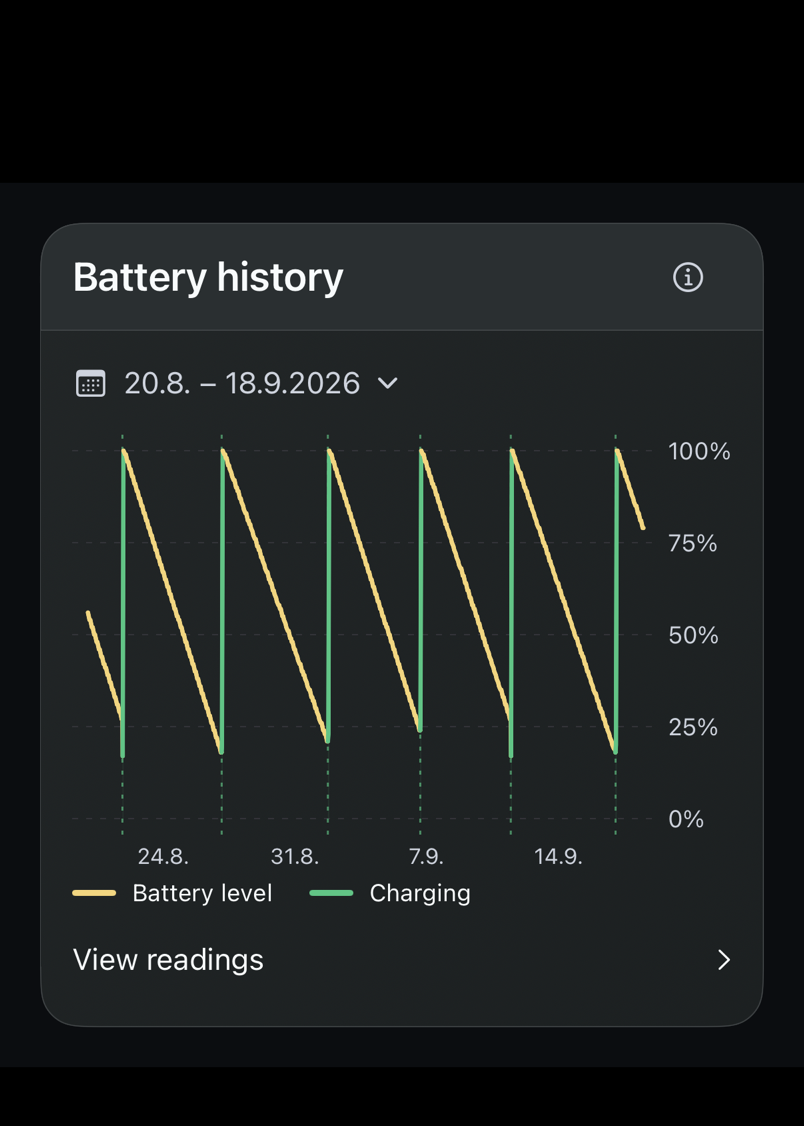
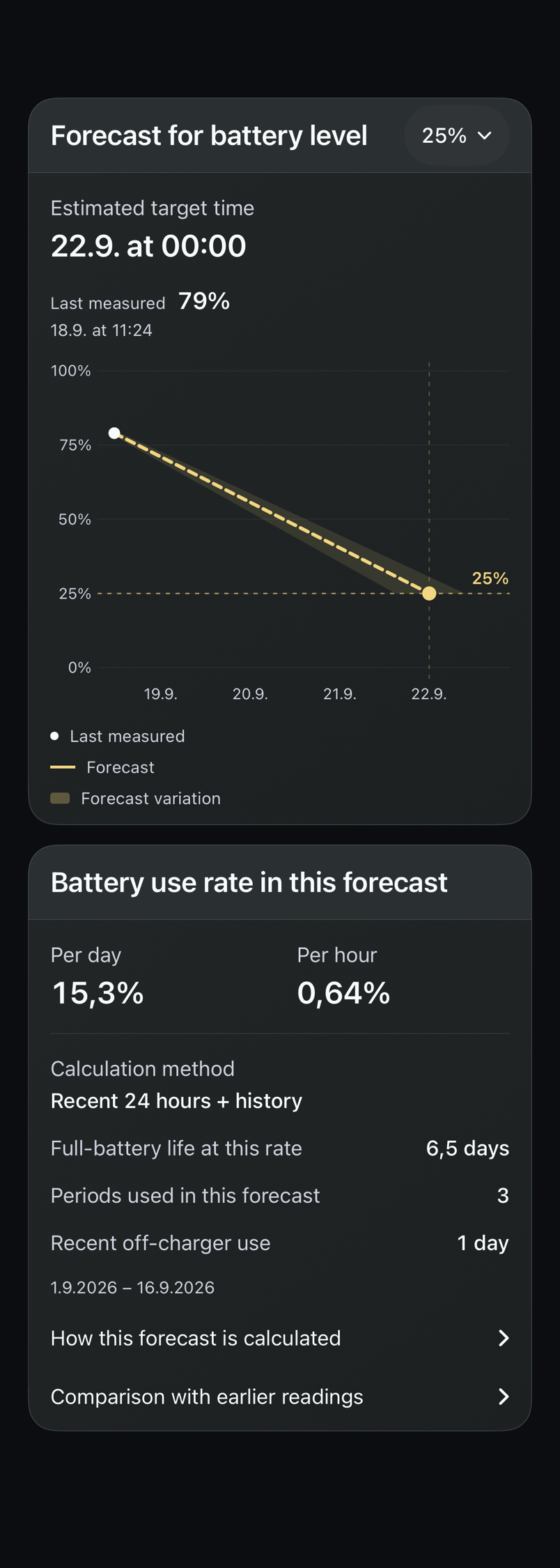
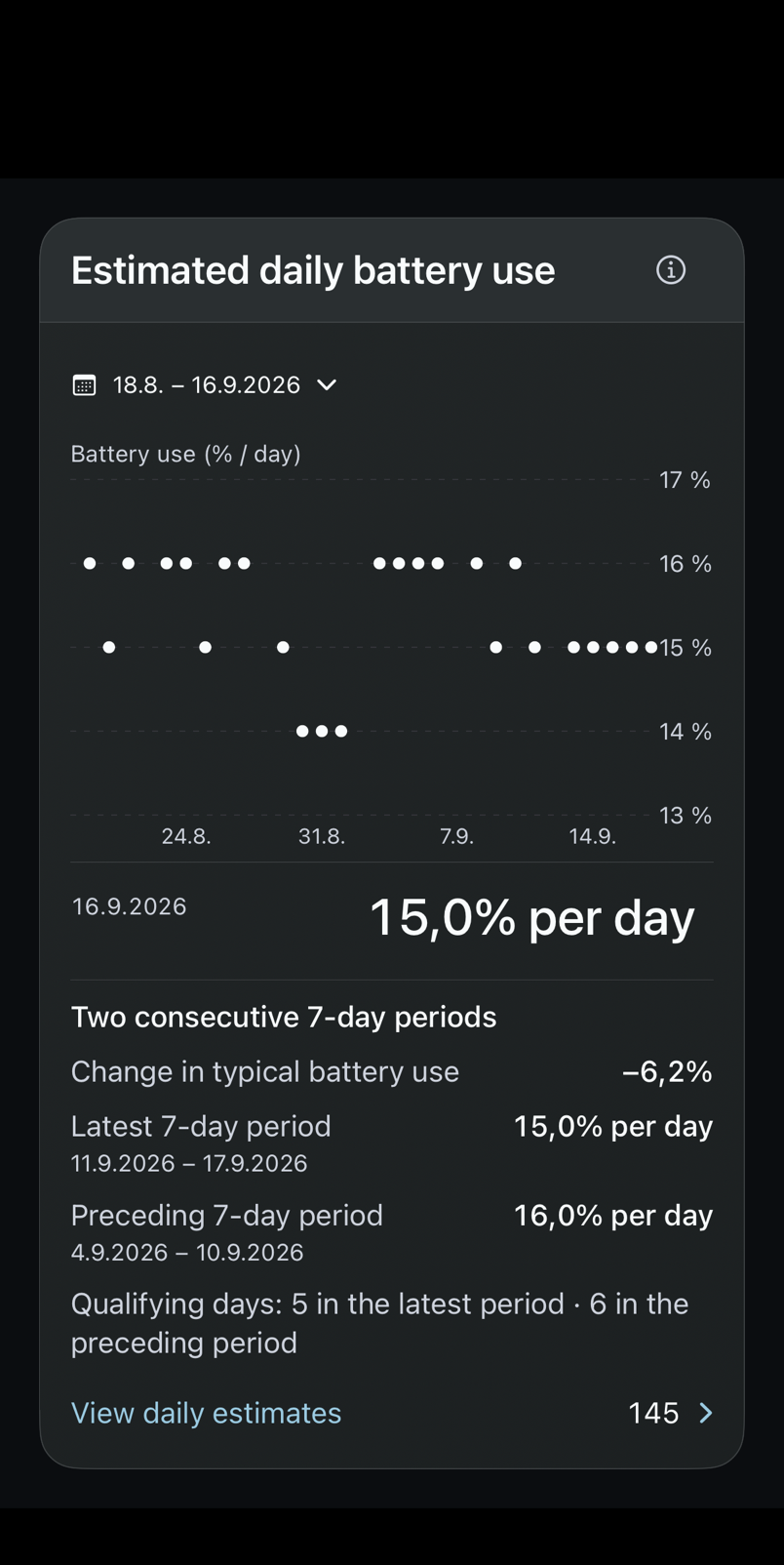
These images were rendered from the production app using artificial sample data. They contain no users’ measurements.
Follow the battery level reading by reading. Green segments distinguish charging from battery use.
Open larger image
Estimate when the battery will reach a level you choose. The dashed line shows the forecast and the shaded area shows its variation.
 Open larger image
Explore daily consumption estimates and see how your battery use changes over time.
 Open larger image
See how quickly the battery drained as its charge level fell. Shading shows the observed variation.
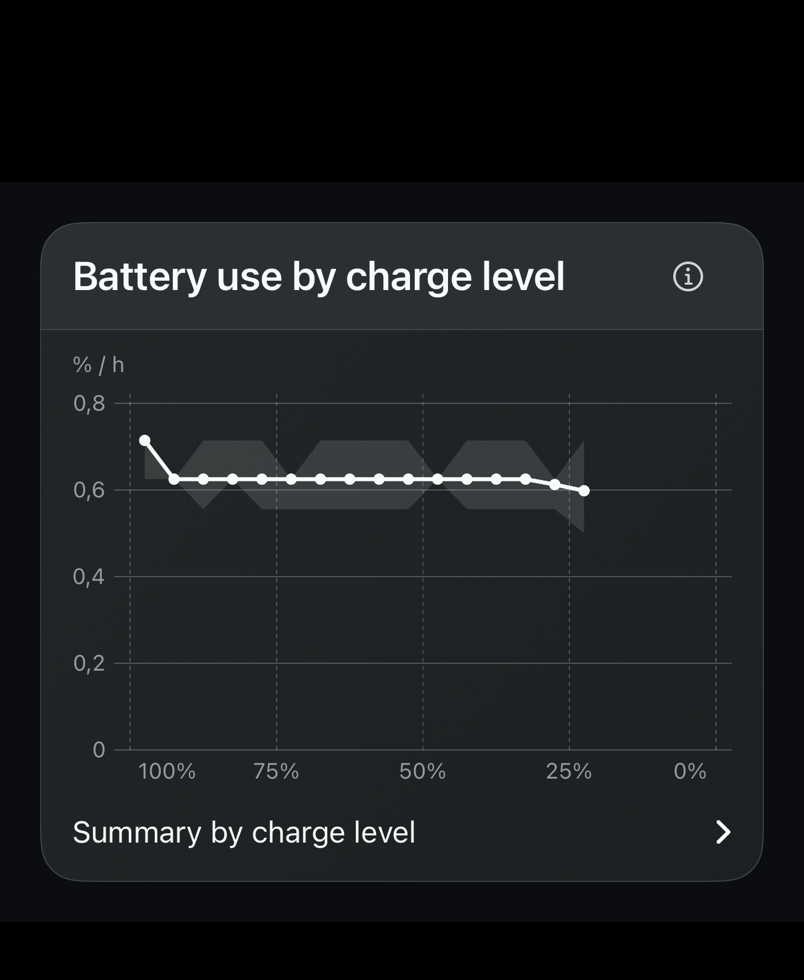 Open larger image
Follow the total built up from measured battery use. A total drop of 100 percentage points equals one cycle; this is not the number of times you charged.
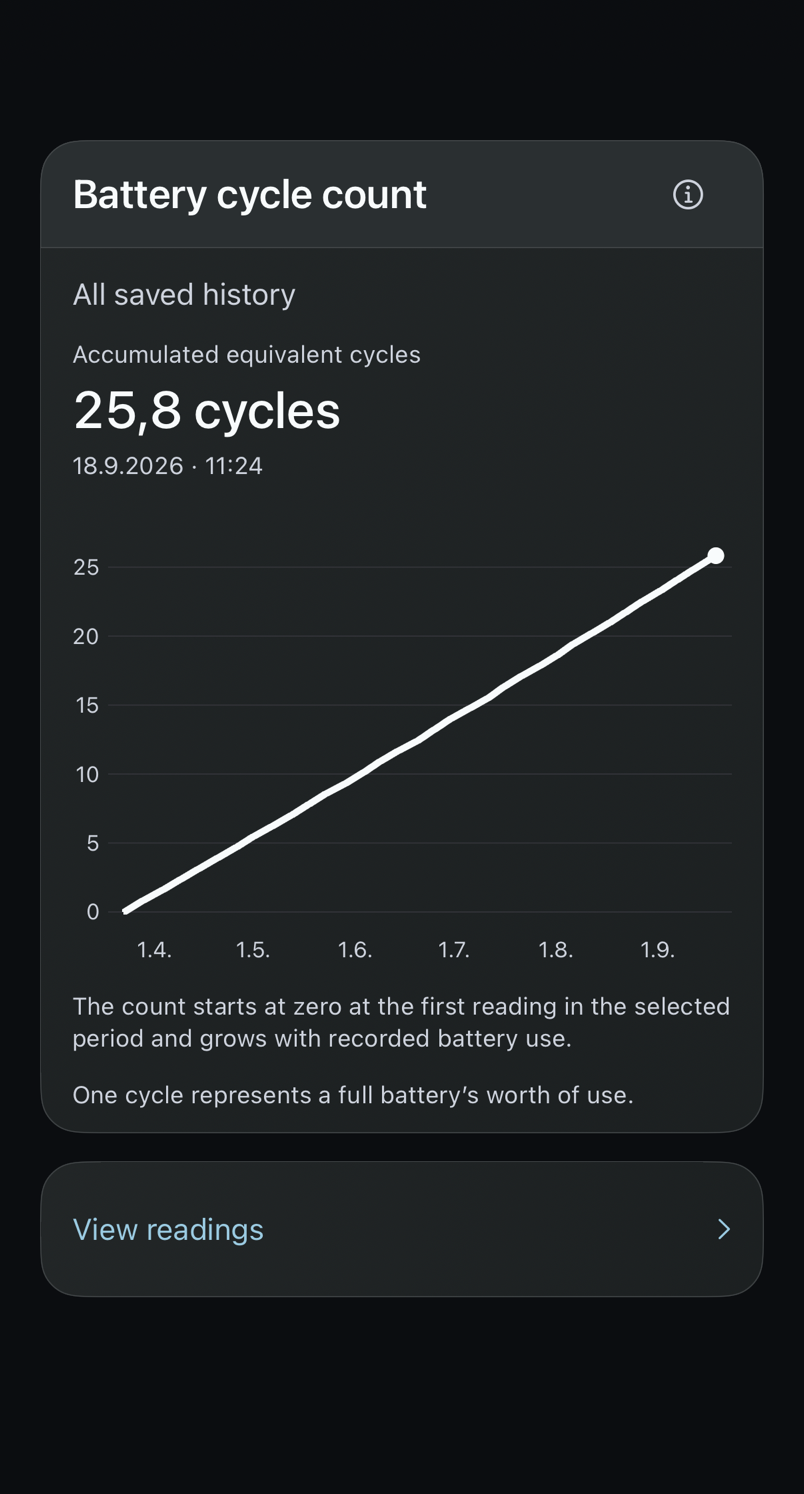 Open larger image
See the recorded time between charges and its average. When you choose to recharge also affects the result.
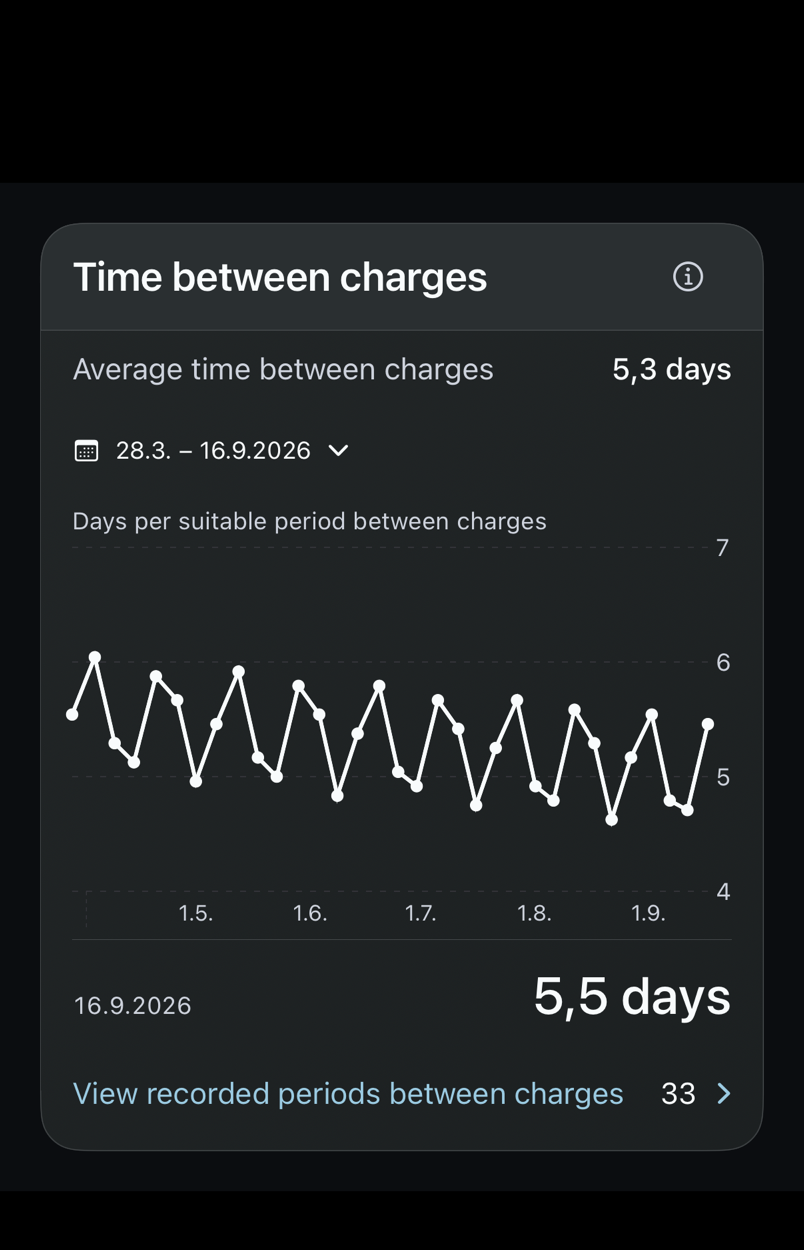 Open larger image
Compare full-battery runtime estimates calculated from use between charges. The battery does not need to reach zero to produce an estimate.
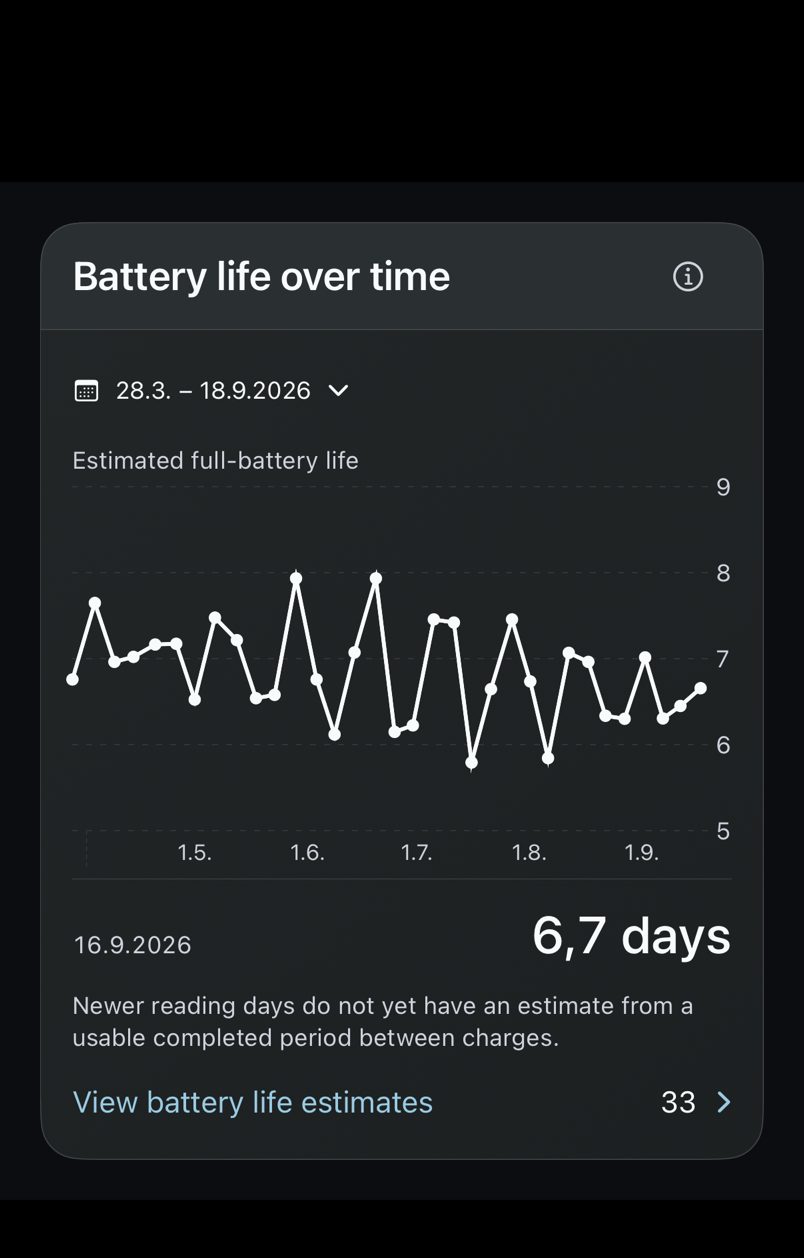 Open larger image
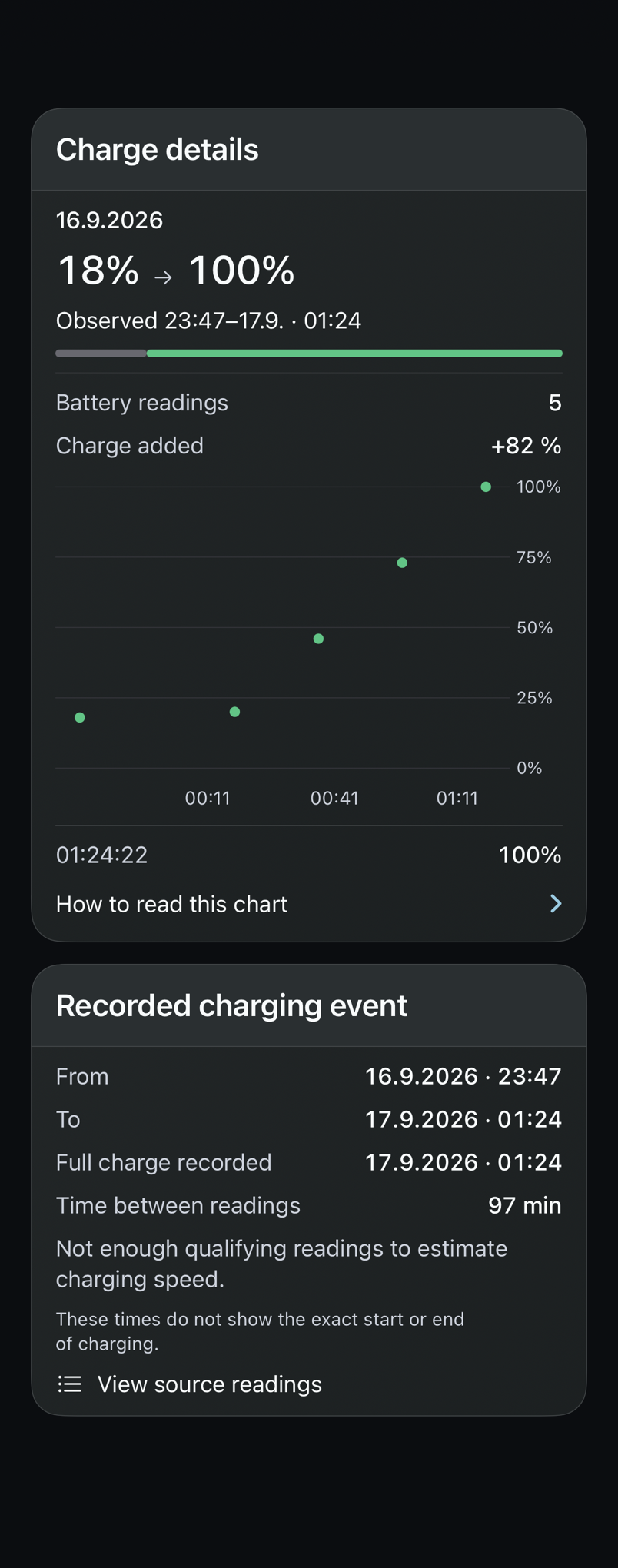
Open a recorded charge to see the rise in battery level and measurement times. Charging speed is shown in percentage points per minute.
 Open larger image
In the app, you can inspect chart points and open the observations behind the calculations. Forecasts and estimates depend on the available readings.
Choose which overview cards to show and their order. Explore a date range, select individual chart readings and open the observations behind a calculation. Ring profiles and confirmed usage periods keep each ring’s statistics separate.
Your saved battery history and estimates stay on your device. The app has no advertising or usage analytics. Oura supplies new readings through its cloud service.
How your data is handled ↗You need an iPhone with iOS 17 or later, a compatible Oura ring and an Oura account. Gen3 and newer rings require an active Oura Membership for API access, purchased separately from Oura. This app’s access to Gen2 battery data has not been verified.
Yes. Free includes the latest battery level and charging status, full saved battery and charging history, charging habits and time between charges. Pro’s forecasts and analysis require Pro access. The app shows purchase and any trial terms before you confirm.
Choose Explore demo on the Oura connection screen to view labelled sample data without an Oura account. Viewing examples does not make a purchase or start a trial.
Ring Battery Monitor fetches readings from Oura’s servers through the Oura API, not directly from your ring. Data first syncs from the ring to the Oura app and then to Oura’s servers. Each stage can take time, so a newer reading may appear in the Oura app before it is available here. Sync your ring in the Oura app with an internet connection, then refresh Ring Battery Monitor. The measurement time shows when the battery was measured; refreshing cannot create a reading that Oura has not yet made available.
This app calculates its own estimate from the battery readings it has saved. Its data and calculation can differ from Oura’s, and recent use or delayed readings can change the result. The forecast is an estimate, not a guaranteed remaining runtime.
Some estimates need enough readings or completed charging intervals. New or incomplete history may not be sufficient. For period-based statistics, choosing a longer period can help. The app explains when the available data is insufficient.